
Returning Students Enrollment
We want to make it easier for returning students to schedule their next lesson.
NOTE: Timeslots may not be reserved any longer than 2 weeks in advance, and a $59 enrollment fee deposit will be collected to reserve your timeslot.
PLEASE READ THESE DIRECTIONS CAREFULLY TO AVOID SCHEDULING ERRORS.
We’re here to help! Email us or call (480) 895-0007 if you have any questions.
We apologize for the inconvenience, but our online scheduling system only reserves 30-minute timeslots. If your child takes a 45- or 60-minute lesson, please select the 30-minute timeslot that matches the correct START TIME as a placeholder. Once we receive your confirmation email, we will update the lesson to the full 45 or 60 minutes.
When possible, please avoid leaving 15-minute gaps in the teacher’s schedule. These openings are too short to use for another lesson.
For the best experience, please view this page on a tablet or computer.
Thank you for helping us keep scheduling simple, accurate, and fair for everyone.
STEP-BY-STEP DIRECTIONS
- STEP 1: Select your INSTRUMENT.
- STEP 2: Choose the lesson DATE and TIMESLOT you want. You have 2 options: You can view all teachers to see every available option, or you can choose one specific teacher.
- OPTION 1: VIEW ALL TEACHER’S SCHEDULES
- If you are not sure which teacher to choose, select “All teachers” at the top of the list. Click different dates and times to see which teachers are available. When you find the teacher and timeslot you want, click “Previous” (not “Next”), to go back and select that teacher from the list. (This is because you’ll need to check the timeslot using STEP 3 to avoid scheduling errors before you confirm.)
- Now go to STEP 3.
- OPTION 2: VIEW SPECIFIC TEACHER’S SCHEDULE
- Select the TEACHER you want from the list.
- Click different dates to see the lesson times that are available. Choose the date and timeslot you want. When you find the teacher and timeslot you want, do not click the box below or click “Next” yet. First, check the timeslot using STEP 3 to avoid scheduling errors.
- Now go to STEP 3.
- OPTION 1: VIEW ALL TEACHER’S SCHEDULES
- STEP 3: Check your timeslot before reserving.
DIRECTIONS FOR 30-MINUTE LESSONS
DIRECTIONS FOR 45- OR 60-MINUTE LESSONS
- FOR 30-MINUTE LESSONS: Choose a time that does not leave a 15-minute gap in the teacher’s schedule, if possible. A 15-minute gap is too short for another lesson.
Available times are shown in 15-minute increments. The open block starts at the FIRST listed time and ends 30 minutes after the LAST listed time.
- EXAMPLE 1: Look at the picture below.
- The 2:00 PM block ends 30 minutes later at 2:30 PM.
- The 4:00 PM block STARTS at 4:00 PM and ends 30 minutes after the LAST listed time of 4:30 PM, which is 5:00 PM.
- Therefore, Mike Kaminski is available from 2:00 PM to 2:30 PM, and again from 4:00 PM to 5:00 PM.
- EXAMPLE 1: Look at the picture below.
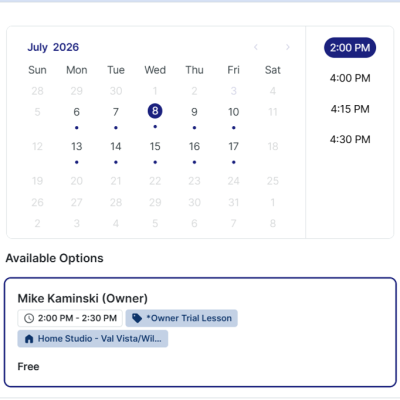
- Since there are 60 minutes open from 4:00-5:00, choose 4:00 or 4:30 as the START TIME. Do not reserve 4:15-4:45 because it leaves an unusable 15-minute gap before and after the lesson.
- EXAMPLE 2: Look at the picture below. In this example, Mike Kaminski is only available from 4:00 PM to 4:45 PM.
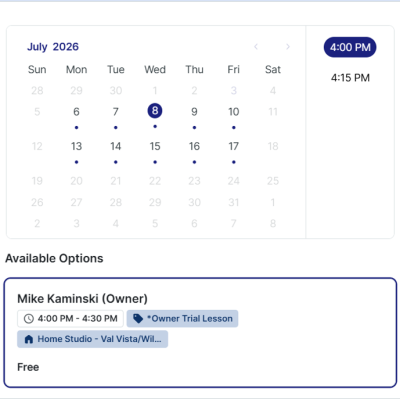
- If only 4:00-4:45 is open, you may choose 4:00 or 4:15. In this case, an unusable 15-minute schedule gap cannot be avoided. That is okay. The office or teacher may contact you later to see if the schedule can be adjusted.
- After you choose a timeslot that avoids a 15-minute gap when possible, go to STEP 4.
- FOR 45- and 60-MINUTE LESSONS: Make sure the full 45- or 60-minute block is available. Also choose a START TIME that does not leave a 15-minute gap in the teacher’s schedule, if possible. A 15-minute gap is too short for another lesson..
Available times are shown in 15-minute increments. The open block STARTS at the first listed time and ends 30 minutes after the LAST listed time.
- EXAMPLE 1: Look at the picture below.
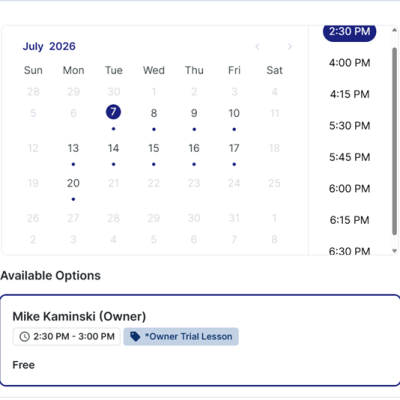
- Mike Kaminski is available from 2:30-3:00 (30 minutes after the 2:30 PM time).
- This is unusable for 45- or 60-minute lessons.
- Mike Kaminski is available from 4:00-4:45.
- This is unusable for a 60-minute lesson.
- A 45-minute lesson can be reserved at 4:00 PM to hold the 45-minutes from 4:00-4:45. Do not reserve the 4:15 PM timeslot because the 30-minute “placeholder” must begin at 4:00 PM to fill the 45-minute availability.
- Mike Kaminski is available from 5:30-7:00. This is usable for any lesson length – just avoid scheduling unusable 15-minute gaps, such as scheduling at 5:45 PM.
- Mike Kaminski is available from 2:30-3:00 (30 minutes after the 2:30 PM time).
- EXAMPLE 2: Look at the picture below.
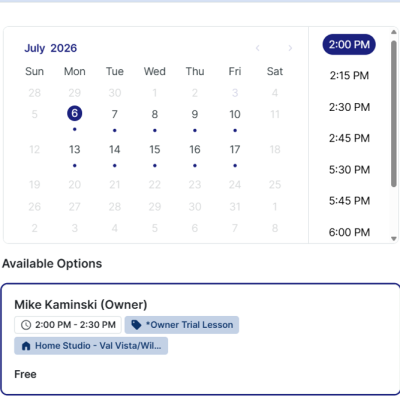
- Mike Kaminski is available from 2:00-3:15 (30 minutes after the 2:45 PM time).
- A 45-minute lesson can be reserved from 2:00-2:45 or from 2:30-3:15.
- A lesson from 2:00-2:45 leaves a usable 30-minute opening from 2:45-3:15.
- A lesson from 2:30-3:15 leaves a usable 30-minute gap from 2:00-2:30.
- Do not choose 2:15-3:00 because it leaves an unusable 15-minute gap before and after the lesson.
- A 60-minute lesson can be reserved from 2:15-3:15 PM. Do not choose 2:00-3:00 because it leaves an unusable 15-minute gap from 3:00-3:15.
- In some cases, an unusable 15-minute schedule gap cannot be avoided. That is okay. The office or teacher may contact you later to see if the schedule can be adjusted. (For example, a 15-minute gap is unavoidable if you reserve a 45-min lesson within a 60-min availability window, or if you reserve a 60-min lesson within a 75-min availability window.)
- After you confirm the full 45- or 60-minute block is available and choose a START TIME that avoids a 15-minute gap if possible, go to STEP 4.
- STEP 4: Select your START DATE and TIMESLOT. Click “Next”, fill out the form, and pay the $59 enrollment fee to reserve your timeslot.
Click the link below…
NOW CLICK HERE TO OPEN THE SCHEDULING WIDGET IN A NEW TAB
Email us or call (480) 895-0007 if you have any questions.